Knowledge Base Help Center
Leave Management in Actpay
The leave management in Actpay is limited to tracking leave taken and leave balance. The primary function is to track available annual leave.
Leave Management Settings
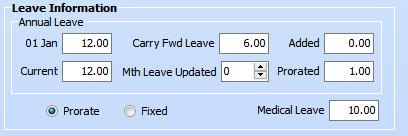
| No. | Label | Function |
| 1. | 01 Jan | Leave entitled at the start of the year. |
| 2. | Current | Leave entitled in current month. Current is greater than “01 Jan” when Annual leave entitlement is increased based on promotion or years employed. |
| 3. |
Carry Fwd Leave |
Leave carried forward from Previous year. |
| 4. | Mth Leave Updated |
This is the month in which the Leave Entitlement was increased. This will be used to calculate proportional leave entitlement based on the new values. |
| 5. | Added | Leave added on by management as replacement for overtime, holidays or other reasons. |
| 6. | Prorated | No. of prorated leave days available. |
| 7. | Prorate / Fixed | If prorated, leave available will be based on number of months worked. If fixed leave available is based on total for the year. |
| 8. | Medical Leave | No. of medical leave days eligible. |
Based on the above screenshot, in January, this employee has 7 days of leave available based on prorated calculations
If Prorated : Leave Balance = CF Days + Prorated – YTD Annual Leave – Current Month Annual Leave = 6 + 1 – 0 – 0 = 7
Since this calculation is based on January before calculating payroll, YTD leave = 0 and leave taken = 0.
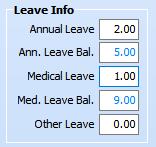 Based on 2 days for Annual leave and 1 day for medical leave, the balance will be 5 days and 9 days respectively.
If Prorated : CF Days + Prorated – YTD Annual Leave – Current Month Annual Leave = 6 + 1 – 0 – 2 = 5
If Fixed : Leave Balance = CF Days + Current – YTD Annual Leave – Current Month Annual Leave = = 6 + 12 – 0 – 2 = 16
Labour Law entitlement
- 0-2 years = 8 days
- 2-5 years = 12 days
- Above 5 years = 16 days.
To use Leave Management, enter the annual leave entitled in “Jan 01”. If Current is blank, it will automatically be filled.
Prorated leave is calculated during the “Initialize month” process. If Prorate is checked or blank for the staff, the prorated leave is calculated and stored in “Prorated”. If “fixed” there is no calculation.
Prorate leave is by default rounded up.
E.g. 1.2 days = 2
To round down, set Prorate Rounding to Down.
Then 1.2 days = 1